If you lead procurement and work closely with finance, you already know how much time gets lost chasing suppliers for documents, approvals, and updates. A vendor portal fixes this by giving suppliers a single place to submit information, track requests, and stay in sync with your team.
This guide walks you through what a vendor portal is, why it matters, and the 12 best practices you need to build a faster, more reliable workflow with your suppliers. Read on!
TL;DR Summary
- A vendor portal centralizes supplier onboarding, document management, invoices, approvals, and communication in one platform.
- It helps procurement and finance reduce manual work, improve compliance, accelerate approvals, and strengthen supplier collaboration.
- Best practices include standardizing onboarding, enabling supplier self-service, integrating with ERP/AP systems, automating workflows, and tracking KPIs.
- AI improves vendor portals through automated data capture, intelligent approvals, exception detection, and real-time insights.
- Choose vendor portal software that offers self-service, ERP integration, workflow automation, secure access, and AI-powered capabilities for long-term scalability.
What is a Vendor Portal?
A vendor portal is a centralized, web-based platform where you and your suppliers exchange information, documents, and approvals without relying on email chains or spreadsheets. Instead of tracking onboarding forms in one system, invoices in another, and compliance documents in a shared drive, you get one connected environment that both procurement and finance can rely on.
You might also know about a vendor portal called a supplier portal, a vendor self-service portal, or a vendor management portal. These terms are often used interchangeably, but they all point to the same core idea: giving suppliers a self-service experience while giving your internal teams better visibility and control.
How a vendor portal improves supplier collaboration
A vendor portal replaces disconnected emails, spreadsheets, and manual follow-ups with a centralized workspace where procurement, finance, and suppliers work from the same information. Suppliers can securely submit documents, update their details, track purchase orders, and monitor request statuses through self-service, while your teams gain complete visibility into every stage of the vendor lifecycle.
A vendor portal helps you:
- Eliminate manual data entry across onboarding, compliance, and payment processes.
- Speed up approvals with automated workflows and notifications.
- Maintain consistent vendor data across procurement and finance.
- Track document, onboarding, and approval status from a single dashboard.
- Improve security by sharing sensitive documents through a secure portal instead of email.
- Strengthen compliance with centralized records and audit trails.
- Deliver a better supplier experience through self-service and real-time status updates.
With the fundamentals covered, let’s look at the best practices for getting the most value from your vendor portal.
Benefits of a vendor portal
When you implement a vendor portal correctly, you can expect to see:
- Faster onboarding cycles, since vendors submit everything through a guided, structured process
- Fewer errors in vendor master data, because information is validated at the point of entry
- Stronger compliance, with documents and certifications tracked and expiring alerts built in
- Better collaboration between procurement and finance, since both teams pull from the same records
- Improved supplier relationships, because vendors get transparency into their own status instead of waiting on your team
With the fundamentals covered, let’s get into the best practices that will help you get the most out of your vendor portal.
Read: Vendor Invoice Processing Checklist: Stage-by-Stage AP Verification Guide
12 Vendor Portal Best Practices

Standardize your vendor onboarding process so every supplier follows the same structured path from day one, reducing errors, delays, and back-and-forth before work can even begin.
1. Standardize vendor onboarding
Your onboarding process sets the tone for the entire vendor relationship, so it needs to be consistent every time. Build a standardized intake form that captures the same fields for every supplier: company information, tax details, banking data, insurance certificates, and compliance documents. When you standardize this process inside your vendor portal, you avoid the common problem of one vendor sending a PDF while another sends a scanned image with half the fields missing.
Set up conditional logic where possible, so vendors only see the fields relevant to their category. A software vendor does not need to fill out the same fields as a raw materials supplier. This keeps the onboarding experience fast and relevant, which increases the odds that vendors complete it correctly on the first try.
2. Enable vendor self-service
A true vendor self-service portal lets suppliers manage their own information without needing to email your team for every small change. This includes updating contact details, uploading renewed certifications, checking invoice status, or downloading remittance advice.
Self-service reduces the administrative load on your procurement team significantly. Instead of fielding routine status inquiries, your team can focus on strategic sourcing and supplier relationship management. Suppliers also benefit, since they no longer have to wait days for a reply to a simple question they could answer themselves in the portal.
3. Automate document collection
Chasing down missing documents is one of the biggest time drains in vendor management. Automate this process by setting up your portal to request specific documents based on vendor type, region, or spend category. If a vendor’s insurance certificate is about to expire, the portal should automatically prompt them to upload a renewed version before it lapses.
This kind of automation protects you from compliance gaps and gives finance the confidence that every vendor on file meets your documentation requirements. It also means your team is not manually tracking expiration dates in a spreadsheet, which is error prone and easy to overlook.
4. Integrate with ERP and AP systems
A vendor portal that operates in isolation creates more work, not less. You need it to connect directly with your ERP and accounts payable systems so vendor data flows automatically between platforms. When a vendor updates their banking information in the portal, that change should sync to your ERP without someone manually re-entering it.
This integration is where procurement and finance collaboration really pays off. Finance relies on accurate, up to date vendor records for payment runs, and procurement relies on the same data for sourcing and contract management. When your vendor portal software integrates cleanly with your existing systems, both teams work from one accurate source instead of duplicating effort.
5. Define clear approval workflows
Ambiguous approval processes are one of the most common reasons vendor requests stall. Define exactly who needs to approve what, at each stage of the vendor lifecycle, from onboarding to contract renewal to payment terms changes. Build these approval chains directly into your vendor portal so requests route automatically to the right person.
Clear workflows also mean your team spends less time asking “who approves this?” and more time actually moving requests forward. Set expectations for turnaround time at each approval stage, and use the portal’s tracking features to flag requests that are sitting too long without action.
6. Strengthen security and access controls
Vendor portals handle sensitive information, including banking details, tax IDs, and contract terms, so security cannot be an afterthought. Use role-based access controls so vendors can only see their own records, and internal users can only access the data relevant to their role. Procurement staff might need full visibility into sourcing details, while finance staff need access focused on payment and compliance data.
Enable multi-factor authentication for all users, encrypt data both in transit and at rest, and maintain detailed audit logs of who accessed or changed what information. This protects your organization from data breaches and gives finance the assurance they need when it comes to SOX compliance or other regulatory requirements.
7. Validate vendor data automatically
Bad data creates downstream problems for both procurement and finance, from failed payments to compliance violations. Build validation rules directly into your vendor portal so errors get caught at the point of entry instead of after the fact. This might include verifying tax ID formats, checking bank account numbers against known patterns, or flagging duplicate vendor records before they get created.
Automatic validation reduces the manual review burden on your team and prevents the kind of data quality issues that cause payment delays or reconciliation bottlenecks for finance. It also builds trust in your vendor’s master data, since everyone knows the information has already been checked.
8. Centralize supplier communication
When vendor communication happens across email, phone calls, and separate messaging tools, information gets lost, and context disappears. Centralize all supplier communication inside the vendor portal so there is a single, searchable record of every conversation, request, and update tied to that vendor.
This is especially useful when there is turnover on your team or when finance needs to review the history of a particular vendor relationship. Instead of digging through old email threads, anyone with the right access can pull up the full communication history in one place.
9. Monitor vendor performance
A vendor portal should not just handle administrative tasks. It should also help you track how your suppliers are performing. Build in performance tracking for metrics like on-time delivery, quality scores, invoice accuracy, and responsiveness to requests.
When you have this data centralized, you can make more informed decisions about which vendors to renew, renegotiate with, or phase out. This also supports better conversations with finance around vendor risk and spend optimization, since you can back up your recommendations with real performance data instead of anecdotal impressions.
10. Drive vendor adoption
Even the best vendor portal software will not deliver results if your suppliers do not use it. Invest time in onboarding your vendors to the platform itself, not just the process it supports. Provide clear instructions, short video walkthroughs, and a responsive support channel for vendors who run into issues.
Consider phasing in your rollout with your highest volume or highest risk vendors first, so you can work out any friction points before expanding to your full supplier base. The easier you make the transition, the faster you will see adoption rates climb and the sooner you will start realizing the time savings the portal is meant to deliver.
11. Track portal performance with KPIs
You cannot improve what you do not measure. Set specific KPIs to track how well your vendor portal is performing, such as average onboarding time, percentage of vendors actively using self-service features, document compliance rates, and average approval cycle time.
Review these metrics regularly with both your procurement and finance stakeholders. This gives you a shared, data-driven view of how the portal is performing and where there is still room to improve. It also helps justify continued investment in the platform when you can point to measurable gains in speed and accuracy.
Read: Top 10 Accounts Payable KPIs to Track in 2026
12. Continuously optimize workflows
A vendor portal is not a set it and forget it tool. As your vendor base grows and your business needs change, your workflows need to evolve too. Regularly review your approval chains, onboarding forms, and document requirements to make sure they still reflect how your organization actually operates.
Gather feedback from both your internal teams and your vendors about where friction still exists. Small adjustments, like simplifying a form field or adjusting an approval threshold, can add up to meaningful time savings across hundreds or thousands of vendor interactions each year.
Read: Invoice Approval Workflow: Best Practices & Solution Guide 2026
Common Vendor Portal Implementation Mistakes
Even with the best intentions, procurement teams run into predictable mistakes when rolling out a vendor portal. Watch out for these pitfalls:
- Skipping stakeholder alignment: If procurement and finance do not agree on data requirements and workflows before implementation, you end up rebuilding processes later.
- Overcomplicating the onboarding form: Asking for too much information up front discourages vendors from completing the process and increases abandonment rates.
- Ignoring integration requirements: A portal that does not connect to your ERP or AP system creates duplicate data entry and defeats the purpose of automation.
- Underinvesting in vendor training: If suppliers do not understand how to use the portal, they will revert to emailing your team directly.
- Failing to assign clear ownership: Without a designated owner for the portal, updates and improvements stall and the system slowly becomes outdated.
- Neglecting security reviews: Rolling out a portal without a proper security assessment puts sensitive vendor and financial data at risk.
Avoiding these mistakes early will save you significant rework and help you build trust with both your internal teams and your vendors from day one.
How AI Improves Modern Vendor Portals
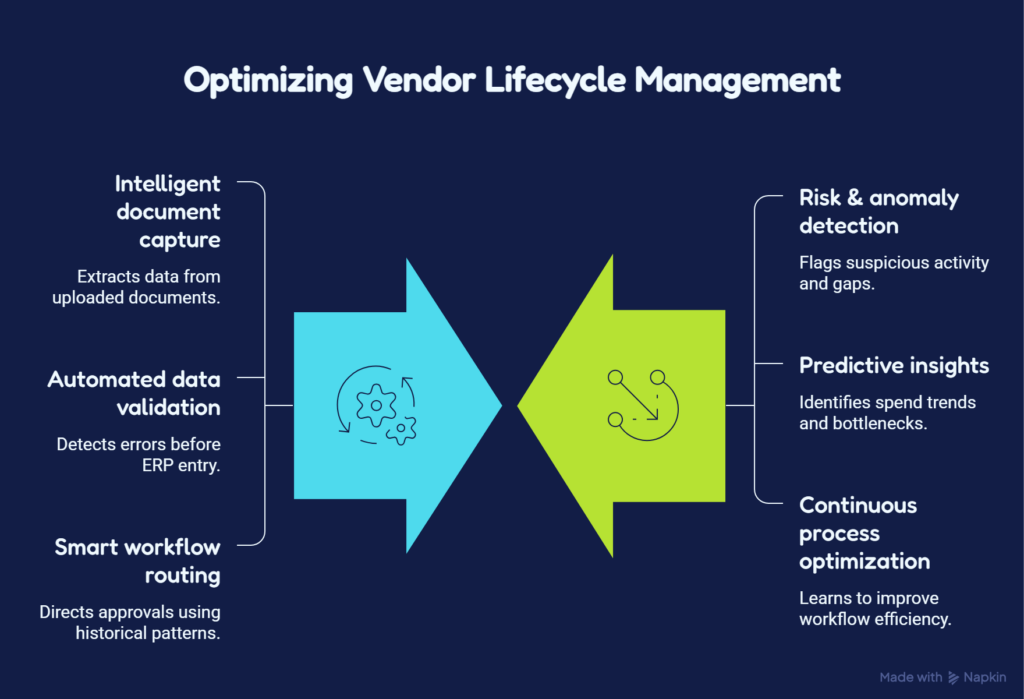
A modern vendor portal should do more than digitize supplier interactions, it should help you work smarter. AI reduces the manual effort required to manage vendors by automating repetitive tasks, improving data accuracy, and surfacing insights that help procurement and finance make faster, more informed decisions.
Instead of reacting to issues after they occur, you can identify risks early, streamline approvals, and continuously improve supplier workflows.
With AI-powered capabilities, you can:
- Reduce administrative work by eliminating repetitive data entry and manual document reviews.
- Improve decision-making with real-time visibility into supplier performance, spend trends, and operational bottlenecks.
- Accelerate approvals by routing requests intelligently, reducing delays and keeping procurement moving.
- Strengthen compliance by identifying data inconsistencies, missing documents, and potential risks before they affect downstream processes.
- Increase data quality so procurement, finance, and ERP systems all operate from accurate, up-to-date vendor information.
- Continuously optimize workflows as AI learns from historical transactions and recommends more efficient ways to manage supplier operations.
Rather than replacing your existing vendor management process, AI enhances it by helping your teams spend less time on administration and more time building stronger supplier relationships, managing risk, and driving strategic procurement outcomes.
Read: Vendor Invoice Management: Complete Guide, Software & AP Solutions
Supplier Collaboration with Serina’s Vendor Portal
Serina’s Vendor Portal is designed to give both procurement teams and suppliers a faster, more transparent way to manage invoices and supplier interactions.
With Serina, you can:
- Simplify invoice submission with drag-and-drop uploads or email, eliminating manual line-item entry and PO selection.
- Support both PO and non-PO invoices through a single, easy-to-use supplier portal.
- Validate invoices instantly by highlighting submission issues before invoices enter your AP workflow.
- Give suppliers real-time visibility into invoice, PO, GRN, and payment status through a centralized dashboard.
- Enable supplier self-service with multiple vendor logins, Statement of Account (SOA) generation, and self-service account management.
- Better supplier support with AI-powered vendor chatbots that answer common questions and reduce dependency on your AP team.
- Increase supplier adoption with a clean, intuitive interface that makes invoice submission and tracking simple.
Ready to simplify supplier collaboration and automate invoice management?
Schedule a personalized demo of Serina today and see how an AI-powered vendor portal can help you accelerate approvals, reduce exceptions, and deliver a better supplier experience.
FAQs
What is a vendor portal?
A vendor portal is a centralized, web based platform where your organization and your suppliers exchange information, documents, and approvals. It replaces scattered emails and spreadsheets with a single system for onboarding, compliance, communication, and payment tracking.
What are the key features of a good portal?
Look for standardized onboarding forms, self-service capabilities, automated document collection, ERP and AP system integration, configurable approval workflows, strong security and access controls, data validation, centralized communication, and performance tracking with reporting dashboards.
How do you improve vendor adoption?
Provide clear instructions and training materials, roll out the portal in phases starting with high priority vendors, offer responsive support for vendors who run into issues, and keep the onboarding process as simple as possible so suppliers see immediate value in using the platform.