
TL;DR
- What it is: Invoice coding is the process of assigning general ledger (GL) accounts, cost centers, departments, and tax codes to each invoice line item before posting.
- When it happens: Before invoice approval and ERP posting, right after data extraction and validation.
- Why it matters: It determines how expenses show up in your financial statements, budgets, and audit trails. Get it wrong, and everything downstream (reporting, compliance, cash flow visibility) gets affected.
- Who does it: AP teams, using traditional workflows, rule-based automation, or AI-powered coding engines.
- Main methods: Manual coding (accurate but slow), rule-based coding (fast but rigid), and AI-powered coding (adaptive, scalable, and increasingly the default for high-volume AP teams).
- Biggest challenges: Incorrect GL account selection, inconsistent coding across departments, high invoice volumes, and missing PO data.
- Best practice: A standardized chart of accounts, clear coding policies, and automated validation before invoices reach approval workflows.
- Where it’s heading: AI models that learn from historical invoices, recognize suppliers, and predict GL codes with confidence scores, leaving humans to review only the exceptions.
Introduction
Every invoice processed by your accounts payable (AP) team must be assigned to the correct general ledger (GL) account, cost center, project, or business unit before it can be approved and posted to the ERP. This process, known as invoice coding, is essential for accurate financial reporting, budget tracking, compliance, and audit readiness. When invoices are coded incorrectly, organizations risk misclassified expenses, approval delays, reporting inaccuracies, and costly corrections during month-end close.
As invoice volumes grow, manual coding becomes increasingly difficult to manage. AI-powered invoice coding helps overcome these challenges by automatically assigning GL codes and accounting dimensions based on historical transactions and predefined business rules, while routing only exceptions for human review.
In this guide, you’ll learn how invoice coding in accounts payable works, common methods and challenges, best practices, and how automation can improve accuracy and efficiency.
What is Invoice Coding in Accounts Payable?
Invoice coding is the process of assigning financial identifiers, such as GL accounts, cost centers, departments, projects, and tax codes, to an invoice or its individual line items so the expense can be accurately recorded in your accounting system. The purpose is to translate an invoice from a vendor’s bill into structured financial data that your ERP or accounting software can process, report on, and reconcile.
Every invoice needs to be coded before it’s posted because, without it, your general ledger has no way of knowing where that expense belongs, which means your financial statements, budget reports, and audit trails would all be built on incomplete or inaccurate data.
Why invoice coding is important
Accurate invoice coding directly shapes the reliability of your financial reporting. When expenses are coded correctly, your income statement and budget reports reflect what happened in the business, department by department, project by project. This accuracy feeds into cost allocation, so leadership can see exactly which teams or initiatives are driving spend, and into budget tracking, so overspending gets caught while it’s still manageable rather than after the fact.
Coding accuracy also has a direct line to compliance and audit readiness. Auditors and tax authorities expect a clean, traceable link between an invoice and its GL entry, especially where tax codes are involved.
According to industry data from the Institute of Finance and Management (IOFM), invoice processing errors, many stemming from coding mistakes, are among the top reasons AP departments face extended audit cycles and rework. Faster, cleaner approvals are a natural byproduct of getting coding right the first time, since approval workflows typically route based on cost center or department codes.
How Invoice Coding Works Within the AP Process
Invoice coding doesn’t happen in isolation. It’s one stage in a broader AP workflow, sitting right after the invoice has been received and validated, and right before it moves into approval and payment. Here’s how the full sequence typically plays out:
1. Invoice receipt: The invoice arrives, whether by email, a supplier portal, EDI, or physical mail, and enters the AP system. This is the starting point for every downstream step, and how the invoice is captured (structured data versus a scanned PDF) affects how much manual work coding will require later.
2. Invoice validation: Before any coding happens, the invoice is checked for basic accuracy: correct vendor, valid invoice number, matching purchase order (if applicable), and no duplicate submissions. Skipping this step means you risk coding and posting an invoice that shouldn’t have been processed at all.
3. Data extraction: Key fields (vendor name, amount, line items, dates, tax details) are pulled from the invoice, either manually or through OCR and AI extraction tools. The quality of this extraction directly determines how accurate the coding step can be, since coding decisions are made based on this extracted data.
4. General ledger coding: This is where each invoice or line item gets assigned to a specific GL account based on the nature of the expense. It’s the financial classification step that determines how the transaction will appear in your books.
5. Cost center/project allocation: Beyond the GL account, invoices are often further tagged to a cost center, department, business unit, or project. This allows finance teams to analyze spend at a more granular level than the GL account alone would allow.
6. Approval workflow: Once coded, the invoice routes to the appropriate approver, typically determined by the cost center or department it was coded to. Accurate coding here means the invoice reaches the right person the first time, rather than bouncing between approvers.
7. ERP posting: The coded and approved invoice is posted into your ERP or accounting system, officially recording the transaction against the assigned GL account and cost center.
8. Payment processing: With the invoice validated, coded, approved, and posted, it moves into the payment run, closing the loop on the AP cycle.
How general ledger (GL) coding works
GL coding is the mechanism that connects an invoice to your company’s financial structure. It relies on several interconnected components:
- Chart of Accounts: The master list of all GL accounts your company uses to categorize financial transactions.
- GL accounts: Specific accounts (like “Office Supplies” or “Professional Services”) that classify what the expense actually is.
- Expense categories: Broader groupings that roll individual GL accounts into categories for reporting.
- Cost centers: Organizational units, like departments or teams, that expenses are attributed to budget tracking.
- Departments: Like cost centers but often reflect the org chart directly.
- Projects: Used when expenses need to be tracked against a specific initiative, especially useful for project-based accounting.
- Tax codes: Indicate how tax should be applied or recorded for that line item, which is critical for compliance.
What information is typically assigned during GL coding?
| Field | Example |
| GL Account | Office Supplies |
| Cost Center | Marketing |
| Business Unit | UAE Retail |
| Project | ERP Upgrade |
| Tax Code | VAT 5% |
Read: Vendor Invoice Management: Complete Guide, Software & AP Solutions
Methods of Invoice Coding in Accounts Payable
There are three broad approaches AP teams use to code invoices, each with a different tradeoff between control, speed, and scalability.
- Manual invoice coding
This is the traditional approach: an AP clerk reviews each invoice and manually assigns the GL account, cost center, and other fields.
Pros:
- Full human judgment on every invoice
- Easy to implement without new software
- Works well for low invoice volumes
Cons:
- Slow, especially as invoice volume grows
- Prone to inconsistency between different coders
- High risk of human error
- Doesn’t scale well across multiple entities or business units
- Rule-based invoice coding
Here, predefined rules automatically assign codes based on conditions, such as “if vendor equals X, assign GL account Y.”
How predefined rules work: Rules are set up in advance based on known patterns, like specific vendors always billing to the same GL account, or specific expense types always mapping to a particular cost center.
Advantages:
- Faster than manual coding
- Reduces coding inconsistency for known patterns
- Straightforward to set up for stable, predictable invoice types
Limitations:
- Breaks down when invoices don’t fit existing rules
- Requires ongoing manual maintenance as vendors, accounts, or business rules change
- Doesn’t adapt on its own to new scenarios
- AI-powered invoice coding
AI-powered coding uses machine learning models trained on historical invoice data to predict the correct coding for new invoices automatically.
Key capabilities include:
- Machine learning: Models improve their predictions over time as they process more invoices.
- Historical invoice learning: The system learns from how similar invoices were coded in the past.
- Supplier recognition: Recognizes recurring vendors and applies consistent coding patterns.
- Predictive GL coding: Suggests or auto-assigns GL accounts and cost centers based on learned patterns.
- Confidence scores: Flags how certain the system is about a given coding decision.
- Human validation for exceptions: Routes only low-confidence or unusual invoices to a human for review, rather than every invoice.
Comparison: Manual vs. Rule-Based vs. AI-Powered Coding
| Factor | Manual | Rule-Based | AI-Powered |
| Accuracy | Depends on individual coder | High for known patterns, low for exceptions | High and improves over time |
| Speed | Slow | Fast for matched rules | Fast across most invoice types |
| Scalability | Poor at high volumes | Moderate, breaks with complexity | High, handles volume and variation |
| Maintenance | Low setup, high ongoing effort | Requires regular rule updates | Self-improving with oversight |
| Exception handling | Manual by default | Poor, often misroutes or fails | Strong, flags for human review |
Read: AP Automation ROI: How to Calculate Real Savings Before You Buy
Example of Invoice Coding in Accounts Payable
Here’s how a single invoice moves through the coding process, from raw invoice to a fully coded, ERP-ready entry.
| Field | Before Coding | After Coding |
| Supplier | Northwind Office Supplies | Northwind Office Supplies |
| Invoice Amount | $1,240.00 | $1,240.00 |
| Expense Type | Office Supplies | Office Supplies |
| Cost Center | Uncoded | Marketing |
| GL Account | Uncoded | 6210 – Office Supplies |
| Approval Status | Pending | Routed to Marketing Manager |
| ERP Posting | Not posted | Ready for posting |
Once coded, the invoice has everything it needs to move through approval and land correctly in your books, with no guesswork left for whoever reviews it next.
Read: Three-Way Matching in Accounts Payable: Complete Guide + Automation Tips
Common Challenges of Invoice Coding
Coding errors rarely happen because AP teams aren’t careful. They happen because the process itself has structural weak points. Here’s why the most common challenges keep showing up.
Incorrect GL account selection
With large charts of accounts and overlapping categories, it’s easy to assign an expense to a similar-sounding but incorrect account, especially when coders are working quickly or covering unfamiliar vendors.
Inconsistent coding across departments
Without a shared coding standard, different departments or coders may classify similar expenses differently, making it hard for finance to get a clean, consolidated view of spend.
High invoice volumes
As transaction volume grows, manual and even rule-based coding struggles to keep pace, leading to backlogs, rushed decisions, and a higher error rate.
Manual data entry errors
Typos, transposed numbers, and misread invoice fields introduce errors at the source, before coding even begins, which then cascade into incorrect GL entries.
Missing purchase order information
Non-PO invoices lack a pre-approved reference point for coding, forcing coders to make judgment calls without the context a PO would normally provide.
Approval delays
Miscoded invoices often get routed to the wrong approver, who then has to reject and reroute them, adding days to what should be a quick approval cycle.
Compliance and audit risks
Incorrect tax codes or misallocated expenses create discrepancies that surface during audits, requiring time-consuming investigation and correction well after the invoice has already been paid.
Each of these challenges compounds the others. A missing PO leads to a rushed manual entry, which leads to an incorrect GL account, which leads to an approval delay, which leads to a compliance flag at audit time. Fixing coding accuracy at the source prevents this chain reaction.
10 Invoice Coding Best Practices
- Maintain a standardized Chart of Accounts: Keep your GL structure clean, well-documented, and free of redundant or overlapping accounts so coding decisions are unambiguous.
- Define clear coding policies: Document exactly how common expense types, vendors, and scenarios should be coded, so every coder (human or system) applies the same logic.
- Automate repetitive coding decisions: For high-volume, predictable invoice types, let rules or AI handle the coding so your team can focus on exceptions.
- Validate invoice data before coding: Catch missing or inaccurate fields at the extraction stage, before they get baked into a GL entry.
- Use approval workflows tied to coding: Route invoices automatically based on cost center or department codes so the right approver sees them without manual handoffs.
- Regularly review coding accuracy: Periodically audit a sample of coded invoices to catch drift or recurring mistakes before they become systemic.
- Track exceptions and continuously improve rules: Treat every miscoded invoice as a data point. Feed that information back into your rules or AI model so the same mistake doesn’t repeat.
- Train new AP staff on coding standards early: Consistency starts with onboarding. Make your coding policy part of day-one training, not something learned informally over time.
- Reconcile coded invoices against budgets regularly: Cross-check that coded expenses align with department budgets to catch misallocations before month-end close.
- Choose software that supports your coding complexity: If you operate across multiple entities, business units, or currencies, make sure your AP tools can handle that complexity rather than forcing workarounds.
For AP teams, these practices reduce daily friction. For finance leaders, they translate into cleaner reporting, faster closes, and fewer surprises at audit time.
Benefits of accurate invoice coding
Faster invoice approvals
Correctly coded invoices route to the right approver on the first try, cutting out the back-and-forth that delays payment.
Better financial reporting
Clean coding means your financial statements reflect reality, giving leadership accurate numbers to make decisions on.
Improved budget visibility
Departments and project owners can see exactly where their money is going, in near real time, instead of discovering surprises at month-end.
Stronger compliance and audit readiness
Accurate GL and tax coding creates a clear, defensible trail that auditors can follow without extensive back-tracking.
Reduced processing costs
Fewer miscoded invoices mean less rework, fewer corrections, and less time spent chasing down discrepancies.
Better spend analytics
Consistent coding gives finance teams reliable data to analyze spending patterns, negotiate with vendors, and identify cost-saving opportunities.
More accurate cash flow forecasting
When expenses are coded correctly and on time, forecasting models have better data to work with, improving the accuracy of cash flow projections.
How to Automate Invoice Coding
As invoice volumes grow and finance teams are asked to do more with leaner headcount, manual and even rule-based coding start to hit a ceiling. Automation isn’t just about speed anymore. It’s becoming necessary to keep coding accuracy consistent at scale, without needing to expand your AP team every time invoice volume grows.
Here’s how a modern, automated invoice coding workflow typically flows:
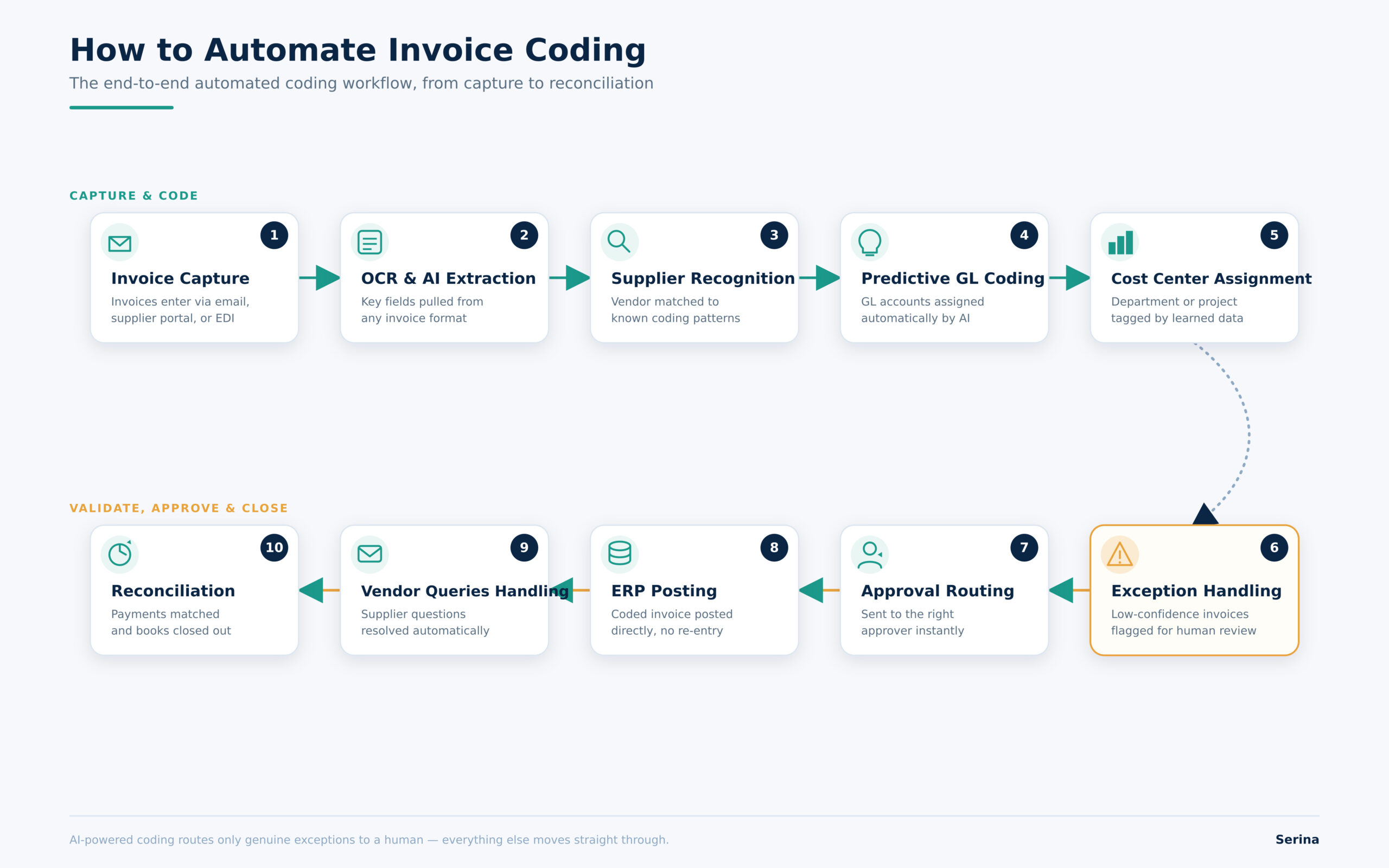
At each stage, AI and machine learning reduce the manual burden. OCR and AI extraction pull structured data from invoices regardless of format. Supplier recognition matches incoming invoices to known vendor patterns. Predictive GL coding then applies learned coding logic automatically, while cost center assignment follows the same pattern based on historical data.
Exception handling is where human oversight remains essential. Invoices that fall outside the system’s confidence threshold, new vendors, unusual expense types, or ambiguous line items, get flagged for a human to review, rather than being pushed through automatically. This human-in-the-loop validation is what keeps automated coding trustworthy, since it ensures the system only acts confidently when it should, and defers to a person when it shouldn’t.
Once coding is complete and validated, invoices move into approval workflows and finally into ERP integration, where they’re posted directly into your accounting system without manual re-entry.
What to Look for in Invoice Coding Software
If you’re evaluating AP automation tools, here’s what actually matters for invoice coding specifically:
- AI-powered GL coding
The system should be able to predict and assign GL codes based on historical patterns, not just apply static rules.
- ERP integration
Coding is only useful if it flows directly into your existing ERP or accounting system without manual re-entry or reconciliation.
- Multi-entity support
If you operate across multiple business units, subsidiaries, or regions, the software needs to handle entity-specific coding structures without extra manual configuration.
- Approval workflow automation
Coding should automatically trigger the right approval path based on cost center, department, or amount thresholds.
- Audit trails
Every coding decision, whether made by a human or the system, should be logged and traceable for compliance and audit purposes.
- Learning from historical invoices
The best systems get more accurate over time by learning from your organization’s specific coding history, not a generic model.
- Tax and compliance support
Coding software should correctly handle tax codes and compliance requirements relevant to your regions and industry, reducing the risk of costly errors.
Automating Invoice Coding with Serina
Serina is an example of a modern AP automation platform built to handle the full complexity of invoice coding, from high-volume PO and non-PO invoices to multi-entity, multi-dimensional accounting structures.
How Serina automates invoice coding
- AI invoice capture: Serina extracts data directly from invoices regardless of format, reducing the manual data entry that introduces errors upstream.
- Intelligent GL coding: Based on the type of bill and the entity or organization it belongs to, Serina applies posting rules that allocate the invoice proportionately to the correct GL codes, following your organization’s specific accounting logic.
- Cost center prediction: Serina learns from historical coding patterns to predict cost center and department assignments automatically.
- PO and non-PO invoice support: Whether an invoice has a matching purchase order or not, Serina applies the appropriate coding logic, including handling allocation, GL posting by unit, and inclusion or exclusion of tax at the line-item level.
- ERP integration: Coded invoices flow directly into your existing ERP system, eliminating manual re-entry and reducing reconciliation work.
- Approval workflows: Invoices route automatically to the right approvers based on how they’ve been coded, keeping the process moving without manual handoffs.
- Audit trails: Every coding decision is logged, giving your finance and audit teams a clear, traceable record for every invoice.
- Exception handling: Invoices that fall outside expected patterns are flagged for human review, so your team focuses attention only where it’s genuinely needed.
- Continuous AI learning: Serina’s coding accuracy improves over time as it processes more of your organization’s invoices, adapting to your specific vendors, accounts, and business rules.
The result for AP teams using Serina is fewer miscoded invoices, faster approval cycles, and cleaner financial reporting, without adding headcount as invoice volume grows.
Ready to see how automated invoice coding could work for your AP team?
Final thoughts
Invoice coding sits at the intersection of operational efficiency and financial accuracy. Get it right, and your approvals move faster, your reporting stays clean, and your audits go smoothly. Get it wrong, and those problems compound quietly until they show up as a bigger issue at month-end or during an audit.
Whether you’re refining a manual process, tightening up your rule-based system, or exploring AI-powered coding for the first time, the goal is the same: consistent, accurate coding that your entire finance function can rely on.
Want to reduce coding errors and speed up your AP workflow? Talk to the Serina team about automating invoice coding for your organization.