| PO-based invoice processing is the accounts payable workflow for invoices tied to a purchase order. When a supplier invoices against a PO, the AP team matches the invoice to the original order and, for physical goods, to the delivery confirmation (goods receipt note) before approving payment. This matching process, known as 3-way matching, is the primary control that ensures your business only pays for what was ordered and delivered at the agreed price |
A purchase order is a commitment. When a supplier invoices against it, the accounts payable process has one fundamental job: verify that the invoice aligns with the commitment before payment is released. How that verification works, how it handles the complexity of real-world procurement, and how automation changes its economics is what this guide covers.
You will find the standard PO-based invoice processing workflow, the 3-way matching decision logic, a comparison of 2-way and 3-way matching, five advanced matching scenarios for invoices that deviate from the standard path, and how automation handles each stage, including the exceptions that would otherwise require manual intervention.
What Is PO-Based Invoice Processing?
Purchase order based invoice processing is the accounts payable workflow applied to invoices that reference a purchase order. The buyer issues the PO to authorize a purchase before delivery. The supplier delivers the goods or services and then issues an invoice referencing that PO number. Because the PO already exists in the buyer’s system, the invoice can be automatically verified against it, making PO-based invoices the most automatable invoice type in accounts payable.

How Does PO-Based Invoice Processing Differ from Non-PO Invoice Processing?
PO-based invoices can be verified against a pre-existing authorized document. The matching engine compares the invoice to the PO and, where applicable, the goods receipt, and approves it automatically if both agree. Non-PO invoices, which cover indirect spend, utilities, emergency purchases, and services without a prior authorization, have no PO to match against. They require manual GL coding, cost center allocation, and additional approval steps before payment can be released. For businesses processing both types, the PO-based workflow typically achieves far higher touchless rates than the non-PO workflow. For more on how non-PO invoices are handled in AP, see our vendor invoice management guide.
What Documents Are Involved in PO-Based Invoice Processing?
Three core documents drive the PO-based invoice processing workflow:
- Purchase Order (PO): Issued by the buyer before delivery. Contains item descriptions, quantities, agreed unit prices, delivery date, and payment terms. It is the authorization that commits the buyer to the purchase and sets the terms against which the invoice will be checked.
- Goods Receipt Note (GRN): Created by the buyer’s receiving team when goods arrive. Confirms what was physically delivered: the items received, the quantity accepted, the date, and any exceptions (damaged, short, or refused items). For 3-way matching, the GRN is the independent confirmation that what was ordered actually arrived.
- Supplier Invoice: Issued by the supplier after delivery. References the PO number and specifies what is being billed: item descriptions, quantities invoiced, unit prices, taxes, total amount due, and payment terms. The invoice is the third document in the 3-way match, and the one that triggers the payment process.
How Does PO-Based Invoice Processing Work? (The Invoice Processing Flowchart)
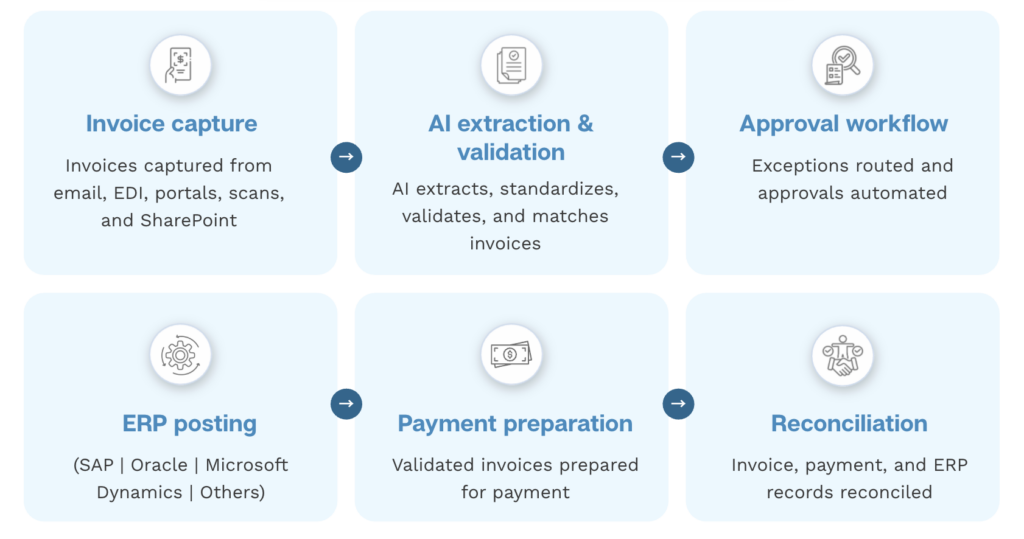
PO-based invoice processing follows a defined sequence from invoice arrival to payment. A well-designed workflow has two paths: a standard path for invoices that match cleanly, and an exception path for those that do not. This structure, rendered as an invoice processing flowchart, is what separates an efficient AP operation from one where every invoice requires manual handling.
- Invoice ingestion. The supplier invoice arrives via email, EDI, vendor portal, or scanned upload. Automated capture pulls it into the AP system from all channels simultaneously, logging it with a date and source record.
- Invoice classified as PO-backed. The system reads the PO reference number from the invoice and confirms it matches an open PO in the ERP. If no valid PO reference is found, the invoice is flagged for manual handling.
- Data extraction. OCR and AI extract line-item data: item descriptions, quantities, unit prices, taxes, and payment terms. Validation rules check field completeness, arithmetic accuracy, and vendor master alignment.
- PO matching. Invoice line items are compared to the PO at line-item level. Each item is checked for description match, quantity alignment, and price match against the agreed PO rate. Minor variances within configured tolerance thresholds auto-approve; variances beyond the threshold generate an exception.
- GRN matching (3-way match). For goods invoices, the matched line items are further compared to the goods receipt note. This confirms that the quantity invoiced corresponds to the quantity the receiving team confirmed as delivered. Invoices for goods not yet receipted are held pending GRN creation.
- Decision point: match or exception?
If the invoice passes both PO matching and GRN matching within tolerance: it proceeds automatically to payment scheduling. If any line generates a discrepancy outside tolerance: the invoice is flagged as an exception and routed to the correct approver by configured rules. - ERP posting. Approved invoices are posted to the ERP with GL codes, cost centers, and vendor references applied automatically. No manual data transfer step between the matching engine and the accounting system.
- Payment execution. The approved invoice is added to the payment run. Payment method, timing, and confirmation follow the vendor’s agreement and the AP team’s payment scheduling rules.
What Is 3-Way Matching and How Does the Decision Logic Work? (The 3-Way Matching Flowchart)
Three-way matching is the core control step in PO-based invoice processing. It compares the purchase order (what was agreed), the goods receipt note (what was delivered), and the supplier invoice (what is being billed). All three must agree within configured tolerances before payment is approved. If they agree, the invoice clears automatically. If they do not, the specific mismatch is flagged and routed for resolution.
Here is the full decision logic of a 3-way match, structured as the flowchart check sequence:
| Check | Pass condition | Pass action | Fail action |
| 1. PO reference | Invoice PO number matches an open PO in the system | Proceed to item check | Flag: PO not found. Route to buyer. |
| 2. Item and description match | Invoice line items correspond to PO line items by description, code, or AI-assisted comparison | Proceed to quantity check | Flag: item mismatch. Route to buyer or procurement. |
| 3. Quantity match (PO vs Invoice) | Invoice quantity does not exceed PO quantity (or falls within tolerance) | Proceed to GRN check | Flag: quantity over PO. Route to buyer. |
| 4. GRN quantity match (Invoice vs GRN) | Invoice quantity does not exceed GRN confirmed received quantity | Proceed to price check | Flag: goods not yet confirmed received. Hold pending GRN. |
| 5. Unit price match | Invoice unit price matches PO unit price within tolerance threshold | Proceed to totals check | Flag: price variance. Route to buyer or procurement. |
| 6. Taxes and totals | Invoice subtotal, taxes, and total match calculated amounts within tolerance | Invoice approved – proceed to payment | Flag: arithmetic or tax mismatch. Route to AP team. |
See our full guide three-way matching.
What Is a Tolerance Threshold in 3-Way Matching?
A tolerance threshold is a configured variance limit within which a minor difference between the invoice and the PO auto-approves rather than generating an exception. Thresholds can be set as a percentage of the line item value or as a fixed amount, and can vary by vendor category, invoice type, or cost center.
Example: a 2% unit price tolerance on a purchase of 100 units at $100 each (PO total: $10,000) means any invoice between $9,800 and $10,200 auto-approves. An invoice for $10,250 triggers an exception. Tolerance thresholds reduce the exception queue significantly on clean PO relationships where minor pricing fluctuations (currency rounding, updated rate cards, small fuel surcharges) are expected and accepted.
Advanced Matching Scenarios: How PO-Based Invoice Processing Handles Real-World Complexity
Standard 3-way matching works well for straightforward invoices. But procurement in practice generates invoices that deviate from the PO in predictable ways. Here are the five most common scenarios and how automated matching handles each.
Scenario 1: What If the Supplier Does Not Replicate the PO Line Items Exactly?
Suppliers often use their own internal product codes, descriptions, or item numbering that differs from the buyer’s PO format. A simple code-to-code match fails in this scenario, generating an exception even when the invoice is correct. Advanced matching uses AI to compare line items by description, quantity, and price rather than by code. If the invoice aligns with the PO in substance, the system achieves an automated match without requiring the AP team to manually resolve what is effectively a formatting difference between two valid documents.
Scenario 2: What If the Invoice Includes Additional Charges Not on the PO?
Freight, fuel surcharges, handling fees, and applicable taxes frequently appear on invoices as separate line items that were not explicitly listed on the original PO. Rather than flagging every such charge as an exception, advanced matching identifies whether the additional charge falls within a recognized category and a configured tolerance. A freight charge within the expected range for the shipment auto-approves. A charge that falls outside the configured parameters routes to the buyer for confirmation. This prevents exception queues from filling with charges that are legitimate but predictable.
Scenario 3: What If a PO Is Fulfilled in Multiple Partial Deliveries?
When a large order is delivered in stages, each delivery generates its own goods receipt note. The supplier may invoice for each delivery separately, or may invoice cumulatively after multiple GRNs have been created. Advanced matching accumulates GRN data across all receipts for the same PO and matches the invoice against the total confirmed-received quantity across those receipts. The system approves payment for the portion that has been confirmed as delivered, holds payment for the undelivered balance, and tracks the open PO commitment throughout the fulfilment cycle.
Scenario 4: What If One Invoice Covers Multiple Purchase Orders?
Suppliers with a large, ongoing product relationship often consolidate billing across multiple POs in a single invoice. Advanced matching splits the invoice lines across the corresponding POs and GRNs, verifies each line against its source document, and processes the consolidated invoice as a unit. Without this capability, multi-PO invoices require the AP team to manually apportion the invoice across the relevant POs, which is time-consuming and error-prone at volume.
Scenario 5: What Happens to High-Value Invoices That Require Additional Approval?
Beyond the matching process, invoices above a configured value threshold may trigger a secondary approval workflow regardless of whether the 3-way match is clean. This is a financial control that requires a senior approver to authorize significant payments independently of the routine matching outcome. Automated routing directs these invoices to the correct approver by configured rules (amount threshold, entity, vendor category) without interrupting the standard workflow for invoices below the threshold.

What Are the Most Common Exceptions in PO-Based Invoice Processing?
Even in a well-automated PO-based invoice processing environment, a proportion of invoices generates exceptions that require human review. Understanding the most common exception types helps AP teams configure their systems to handle them efficiently and reduce the manual workload to genuine judgment calls.
According to the Institute of Finance and Management, manual invoice processing carries an error rate of approximately 2%. With automation and consistent validation controls, error rates can fall to below 0.8%. The difference reflects what automation eliminates: transcription errors, missed validation steps, and inconsistent matching decisions that vary by team member.
- Price variance above tolerance: Invoice unit price differs from the PO price by more than the configured threshold. Routed to the buyer or procurement team with the PO rate and invoice rate visible for comparison.
- Quantity mismatch: Invoice quantity exceeds the GRN confirmed quantity. Payment held for the excess; the matched portion may be released for payment separately if the business rules permit partial payment.
- Missing or unrecorded GRN: A goods receipt has not been recorded in the system, preventing 3-way matching from completing. Invoice pended; automated notification sent to the receiving team to confirm delivery.
- Duplicate invoice: Same invoice number, same vendor, same amount already exists in the system. Flagged automatically and held. No manual review required unless the vendor confirms it is a genuine new invoice.
- PO not found or PO already closed: Invoice references a PO that does not exist, has already been fully invoiced, or has been cancelled. Routed to the relevant buyer or procurement manager for resolution.
- Invoice received before delivery: Supplier has submitted an invoice before the goods have arrived and the GRN has been created. System holds the invoice in a pended state rather than routing it for approval.
What Are the Key Benefits of Automating PO-Based Invoice Processing?
Does Automation Increase the Touchless Rate for PO Invoices?
Yes. PO-backed invoices are inherently more automatable than non-PO invoices because the matching documents exist before the invoice arrives. When matching rules are well-configured and supplier invoice quality is consistent, the majority of PO invoices can flow through the system without manual intervention. The Institute of Finance and Management’s practitioner research found that 84% of AP practitioners’ time is currently spent on manual tasks, a figure that falls significantly as the touchless rate improves.
See our touchless invoice processing guide for learn what touchless rate means in AP.
How Does 3-Way Matching Reduce Fraud and Overpayment Risk?
Three-way matching makes it structurally impossible to pay for goods that were not ordered and not delivered. The purchase order check ensures a prior authorization exists. The goods receipt check ensures delivery was confirmed independently by the receiving team. The combination prevents the most common invoice fraud vectors: phantom invoices for goods never ordered, inflated quantity billing, and payments for goods still in transit.
The AFP 2025 Payments Fraud and Control Survey found that 79% of organizations experienced attempted or actual payment fraud in 2024. Three-way matching on PO-backed invoices is one of the most effective single controls against these losses, because it requires independent confirmation of delivery before any payment is released.
What Is the Early Payment Discount Benefit of Faster PO Invoice Processing?
When PO invoice matching runs automatically, the approval cycle for clean invoices completes in hours rather than days. This consistent speed allows AP teams to capture 2/10 net 30 early payment discounts reliably. A business with significant AP spend that misses most discount windows because of slow manual processing is forfeiting a material financial benefit with every payment run. Automated PO invoice processing removes the processing delay that causes those windows to be missed.
How Does Automation Support Audit Readiness?
Every matching decision, approval, exception, override, and posting is timestamped and logged automatically. The resulting audit trail documents exactly who approved what, when, against which documents, and at what matching confidence. This is the level of evidence an auditor expects when reviewing accounts payable controls – and it is a standard output of automated PO invoice processing, not a retroactive exercise.
How Does Serina Handle PO-Based Invoice Processing?
Serina’s AP automation platform is built for the full range of PO-based invoice processing scenarios, from straightforward 3-way matches to the advanced matching scenarios described above.
- AI-powered invoice capture from any channel: Invoices are ingested from email, vendor portals, EDI feeds, scanned uploads, and shared folders automatically, with no manual sorting required.
- Line-item 3-way matching with advanced scenario handling: Serina matches invoices to POs and GRNs at line-item level, handling supplier format variation, additional charges, partial deliveries, multi-PO invoices, and high-value routing within the same automated workflow.
- Configurable tolerance thresholds: Minor price or quantity variances within business-defined thresholds auto-approve without generating exceptions, reducing manual exception volume while maintaining the controls that matter.
- ERP integration with SAP, Oracle, and Microsoft Dynamics: PO and GRN data is pulled from the ERP automatically; approved invoices are posted back with GL codes, cost centers, and vendor references complete. No manual transfer step.
- Exception routing by configured rules: Genuine exceptions are routed to the correct approver by exception type, invoice amount, vendor, or cost center. No shared inboxes; no manual triage.
- Real-time dashboard on processing performance: Live visibility into touchless rate, exception rate, and processing cycle time across the full PO invoice portfolio.
Talk to the Serina team about your specific PO invoice environment.
Conclusion
PO-based invoice processing is the most automatable part of accounts payable, because the authorizing document already exists before the invoice arrives. When the matching logic is well-configured, including tolerance thresholds, GRN tracking, and handling for the common advanced scenarios, the majority of PO invoices flow from receipt to payment without manual intervention.
The AP team’s role shifts from processing invoices to managing the exceptions that genuine discrepancies generate. That shift is where the financial and operational benefit of automation is realized: fewer errors, fewer overpayments, faster cycles, and a finance team with time to focus on the work that requires judgment rather than document comparison.
See how Serina handles PO-based invoice processing for your ERP environment.
Frequently Asked Questions
1. What is the difference between a PO invoice and a non-PO invoice in accounts payable?
A PO invoice references a purchase order that was raised before the goods or services were delivered. It can be automatically matched and verified because the authorizing document already exists in the system. A non-PO invoice arrives with no prior authorization document. It requires the AP team to manually assign a GL code, allocate a cost center, confirm the purchase was legitimate, and obtain approval before it can be paid. Non-PO invoices typically generate higher exception rates and longer processing times than PO-backed invoices, because the validation work must be done from scratch rather than by comparison to an existing document.
2. What causes the most delays in PO-based invoice processing?
- Missing or unrecorded GRNs: the most common delay. The receiving team has taken delivery but not yet updated the system. The invoice arrives and cannot be 3-way matched until the GRN is created.
- PO already closed: a supplier invoices for a delivery that arrived after the PO was administratively closed. Requires the buyer to reopen or create a new PO before the invoice can be processed.
- Supplier using different product codes or descriptions: generates a false mismatch that a rule-based system flags as an exception. Advanced AI-matching resolves this automatically.
- Invoice received before delivery: supplier invoices in advance of the delivery. The invoice is held pending the GRN, which delays payment even when the invoice itself is correct.
3. What happens when an invoice is received before the goods receipt note is created?
The invoice enters a pended state. The 3-way matching engine cannot complete without a confirmed goods receipt, so rather than generating a manual exception, the system holds the invoice and sends an automated notification to the receiving team that a GRN is needed. Once the receiving team records the delivery in the system, the matching engine runs automatically and the invoice proceeds without any further manual handling, assuming the quantities and prices align.
4. How do tolerance thresholds work in automated PO invoice matching?
Tolerance thresholds define the variance range within which a minor difference between the invoice and the PO auto-approves. They can be configured as a percentage of the line item value (for example, 2% price tolerance), a fixed amount (for example, no more than $50 variance per line), or both. Thresholds can vary by vendor category, invoice type, or cost center. When an invoice variance falls within the threshold, it clears automatically. When it exceeds the threshold, it generates an exception routed to the appropriate approver. Thresholds should be set conservatively at first and adjusted based on the exception patterns that emerge from the first few months of processing.
5. Can PO-based invoice automation handle partial deliveries across multiple goods receipts?
Yes. When a PO is fulfilled in stages, each partial delivery generates a separate goods receipt note. Automated matching accumulates GRN data across all receipts for the same PO and matches each invoice against the total confirmed-received quantity. The system distinguishes between the delivered quantity, the undelivered balance, and the invoiced quantity, and releases payment only for what has been confirmed as received. This prevents overpayment for unfulfilled orders and removes the need for the AP team to manually track cumulative delivery against the PO commitment.
6. Does PO-based invoice automation integrate directly with ERP systems like SAP and Oracle?
Yes. PO and GRN data is pulled from the ERP into the matching engine automatically, so the matching process always works from current, accurate source documents. When an invoice is approved, the posting data, including GL codes, cost center allocations, vendor references, and payment terms, is pushed back to the ERP without a manual transfer step. For Serina, this bidirectional integration is available for SAP S/4HANA and ECC, Oracle Fusion Cloud, and Microsoft Dynamics 365 Finance. [S3]
7. What is the difference between 3-way matching and invoice reconciliation?
Three-way matching is a pre-payment, transaction-level control. It verifies an individual invoice against its purchase order and goods receipt before authorizing payment. Invoice reconciliation is a post-period, account-level control. It compares the cumulative AP ledger balance for a vendor against the vendor’s own statement of account for the period, to confirm that both records agree on total invoices raised, payments received, and credits outstanding. Both are required in a complete AP control framework. Three-way matching prevents paying incorrect individual invoices; invoice reconciliation confirms the overall account relationship is accurate after transactions are processed. For the full guide, see our invoice reconciliation guide.