
Your books say one thing. Your bank says another. If you have ever closed a month with a cash balance you could not fully explain, you already know why bank reconciliation exists.
For IT and finance leaders running ERP systems across multiple entities and bank accounts, manual statement matching is more than a nuisance. It slows down month-end close, hides timing differences, and lets small errors sit unnoticed until they become big ones.
This guide breaks down what bank reconciliation is, why it matters, and exactly how to do it. You will get a step-by-step bank reconciliation process, a worked example, common errors to watch for, and practical best practices you can put in place this month.
TL;DR
- Bank reconciliation compares your bank statement with your accounting records to identify and resolve differences.
- It helps catch errors, missing transactions, duplicate entries, bank fees, and unauthorized activity.
- The process involves comparing balances, matching transactions, investigating discrepancies, making adjustments, and confirming the final balance.
- Regular reconciliation gives finance teams greater confidence in cash balances and financial records.
- Automation reduces the manual matching burden and shortens month-end close cycles.
What is Bank Reconciliation?

Before looking at the process itself, it helps to understand what is actually being reconciled. A bank and an accounting system maintain separate records of the same cash activity, so differences can appear even when both records are correct.
Bank reconciliation is the process of comparing your bank statement against your internal accounting records, often called the cash book or general ledger cash account, to confirm that both reflect the same transactions and arrive at the same ending balance.
You are essentially comparing two independent records of the same cash activity:
- The bank statement: the bank’s record of every deposit, withdrawal, transfer, and fee posted to your account.
- Your accounting records: the transactions your team has recorded in your ERP or accounting system for that same account.
When the two balances do not match, it does not automatically mean something is wrong. Most of the time, the gap comes from timing differences, such as a check you issued that has not cleared the bank yet. But sometimes it does point to a real problem: a missed transaction, a duplicate entry, a bank error, or something that needs immediate investigation.
It is worth briefly distinguishing bank reconciliation from a cash book. The cash book is where you record cash transactions as they happen. Bank reconciliation is the control activity that checks the cash book against an independent source, the bank statement, to verify that it is accurate and complete.
Once you understand what is being compared, the bigger question is why the exercise deserves attention from leadership. That comes down to what an inaccurate cash record can affect beyond the bank account itself.
Why is bank reconciliation important?
For a CIO, IT director, or ERP lead, bank reconciliation is not just an accounting formality. It is a control point that protects the integrity of the numbers your ERP feeds into every other report.
4 reasons bank reconciliation matters
- Catches accounting errors: Regular reconciliation identifies data entry mistakes, duplicate entries, and transactions that were never recorded, before they distort your reports.
- Identifies unauthorized transactions: Comparing every line item against your own records helps you spot suspicious withdrawals or payments early, rather than months later.
- Keeps cash balances accurate: Your accounting system should always reflect what is actually happening in the bank. Reconciliation is how you verify that.
- Supports financial control: Reliable cash data gives finance leaders confidence in reporting, forecasting, and cash management decisions, especially across multiple accounts and entities.
These controls also play an important role in detecting fraud. According to a ACFE Occupational Fraud 2024 Report to the Nations, organizations lost an estimated 5% of annual revenue to occupational fraud, and reconciliation controls are cited as one of the most effective ways to detect it early.
The value becomes even clearer when you consider what happens during an actual reconciliation. Before getting into the seven steps, a few terms will make the process, and the example that follows easier to understand.
Important terms to know for bank reconciliation
A short glossary helps here, without turning this into a reference manual:
- Bank statement balance: the closing balance shown on your bank statement for the period.
- Book balance: the cash balance recorded in your own accounting records for the same period.
- Outstanding checks/payments: payments you have recorded and issued, but that have not yet cleared the bank.
- Deposits in transit: deposits you have recorded, but the bank has not yet posted.
- Bank fees: charges the bank deducts, such as monthly service or wire fees, that may not yet be in your books.
- Interest income: interest the bank has credited to your account that you have not yet recorded.
- Adjustments: the entries you make to correct or update your books once you identify legitimate differences.
- Reconciliation difference: any remaining gap between the adjusted bank balance and the adjusted book balance that still needs explanation.
With these terms in place, you can see why reconciliation is not simply a matter of making two numbers match. The next step is to work through the differences systematically and determine what each one represents.
Want to know more about invoice reconciliation? Read this blog on Invoice Reconciliation: A Complete Guide to Process, Types & Best Practices to learn more.
How to Do a Bank Reconciliation: Step-by-Step
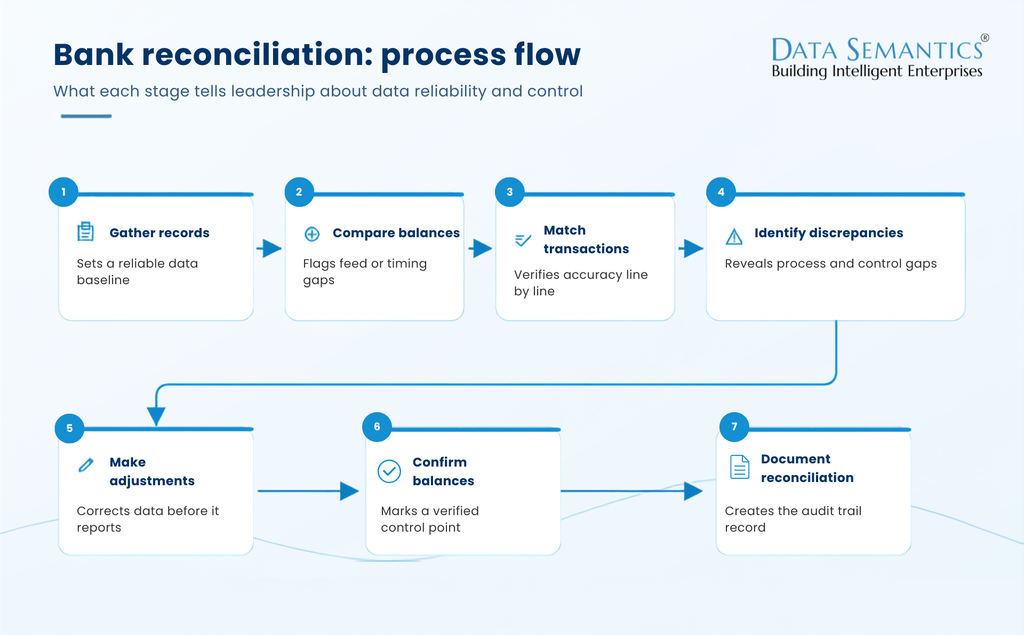
A bank reconciliation is more than a transaction-matching exercise. Each step helps verify that the cash position in your accounting system reflects what is happening in your bank accounts. For organizations managing multiple accounts, entities, or currencies, a consistent process also creates a stronger control over financial data.
Here is the full bank reconciliation process, broken into seven practical steps.
Step 1: Gather your records
Collect the latest bank statement, your general ledger or cash book, and any supporting records you may need, such as payment approvals, deposit slips, or transaction confirmations.
Make sure you are working with complete records for the same period and account. Missing or incomplete source data can create false discrepancies and make it difficult to determine whether a difference is a timing issue or a genuine error.
Step 2: Compare your starting balances
Confirm that the opening balance in your accounting records matches the ending balance from your previous reconciliation. If it does not, resolve that difference before moving forward.
This gives you a reliable starting point. For finance and IT teams, an unexpected opening-balance difference can also indicate an earlier reconciliation issue, a missing transaction, or a problem with how data is flowing between banking systems and the ERP.
Step 3: Match transactions
Compare deposits, withdrawals, payments, transfers, and other activity between the bank statement and your accounting records, item by item.
The objective is not simply to find two transactions with the same amount. You also need to verify that the transaction belongs to the right account, period, and record. At higher transaction volumes, this is where manual reconciliation can become time-consuming and prone to missed exceptions.
Step 4: Identify discrepancies
Investigate every transaction that does not have a clear match. Common causes include timing differences, missing transactions, duplicate entries, bank fees, data entry errors, and unauthorized activity.
Not every discrepancy requires an accounting correction. A payment that has been recorded in the books but has not yet cleared the bank may simply be an outstanding payment. The important thing is to distinguish expected timing differences from issues that require investigation.
For leadership teams, recurring discrepancies can also provide a useful signal. A high volume of the same type of exception may point to weaknesses in a process, data feed, or system integration rather than isolated accounting errors.
Step 5: Make adjustments
Record legitimate items that appear on the bank statement but are missing from your books, such as bank fees or interest income. Correct any accounting errors identified during the reconciliation.
The goal is to bring your accounting records up to date without using adjustments to simply force the two balances to agree. Every adjustment should have a clear reason and supporting evidence.
Step 6: Confirm the final balances
Once all valid differences have been investigated and adjustments recorded, the adjusted bank balance and adjusted book balance should agree.
If they do not, go back through the unmatched transactions and adjustments rather than closing the reconciliation with an unexplained difference. A completed reconciliation gives Finance a defined control point before the cash data is used for financial reporting, forecasting, or cash management.
Step 7: Keep a record
Document the reconciliation, including the accounts and period reviewed, adjustments made, unresolved items if any, and supporting evidence.
Maintaining this record creates an audit trail and makes future reviews easier. It also gives finance and technology leaders greater visibility into how financial data was validated, particularly when reconciliation is performed across multiple entities or bank accounts.
For organizations with high transaction volumes or complex ERP environments, this process can become difficult to manage manually. Reconciliation software can automate much of the matching work, flag exceptions, and maintain a consistent audit trail, allowing teams to focus their time on the items that require human judgment.
The process becomes much easier to understand when you see how the numbers move from an unreconciled position to a confirmed balance.
Read More: How Invoice Automation Reduces Errors and Boosts Productivity Across AP Departments
Bank reconciliation example
A simple numerical example makes the reconciliation process easier to follow.
Say your bank statement shows a balance of $25,000, while your accounting records show a book balance of $24,600. When you compare the two records, you identify the following differences:
- $2,000 in outstanding payments that have been recorded in your books but have not yet cleared the bank.
- $1,500 in deposits in transit that have been recorded in your books but have not yet been posted by the bank.
- $100 in bank fees that appear on the bank statement but have not yet been recorded in your books.
The bank-side reconciliation would look like this:
| Item | Adjustment | Adjusted Balance |
| Bank statement balance | — | $25,000 |
| Add: Deposit in transit | +$1,500 | $26,500 |
| Less: Outstanding payments | -$2,000 | $24,500 |
| Adjusted bank balance | $24,500 |
On the book side, the $100 bank fee needs to be recorded as a deduction because it appears on the bank statement but has not yet been entered into the accounting records:
- Book balance: $24,600
- Bank fee not yet recorded: −$100
- Adjusted book balance: $24,500
The adjusted bank balance and adjusted book balance now both equal $24,500, confirming that the identified differences have been accounted for.
The key is to distinguish timing differences from items that require book adjustments. Outstanding payments and deposits in transit are temporary timing differences, while bank fees require an accounting adjustment. Other discrepancies may point to errors or control issues that need further investigation.
Common bank reconciliation errors
Most reconciliation problems fall into a handful of familiar categories.
- Timing differences: Transactions the bank and your business record at different points in time, such as a check that has been issued but not yet cashed.
- Missing or unrecorded transactions: Bank fees, interest, deposits, or payments that have not yet been entered into your books.
- Data entry mistakes: Incorrect amounts, dates, or transaction details entered on either side.
- Duplicate transactions: The same payment or receipt recorded more than once.
- Unauthorized transactions: Activity that does not match anything in your records and needs investigation rather than a routine adjustment.
Most of these are routine and easy to resolve once flagged. The ones worth escalating quickly are duplicates and unauthorized activity, since both can point to control gaps or, in some cases, fraud.
Read: AP Automation ROI: How to Calculate Real Savings Before You Buy
That raises another practical question for leadership: how long should an issue be allowed to remain hidden before someone catches it? The answer depends partly on how frequently the account is reconciled.
How Often Should You Reconcile Your Bank Account?
Monthly reconciliation is the baseline for most businesses, and it lines up naturally with month-end close. But monthly is not always frequent enough.
High-volume accounts, accounts with multiple approvers, or accounts prone to fraud attempts benefit from weekly or even daily reconciliation. The more often you reconcile, the sooner you catch an issue, and the easier it is to trace back to its source while the underlying transaction is still fresh.
The right frequency for your organization depends on a few factors:
- Transaction volume: more transactions mean more opportunities for mismatches.
- Number of accounts: businesses with multiple bank accounts or entities face more reconciliation work overall.
- Business size: larger organizations typically need tighter, more frequent controls.
- Risk profile: accounts with a history of errors or fraud attempts warrant closer, more frequent review.
Frequency, however, is only part of the equation. Reconciling every account regularly will not solve much if the process itself is inconsistent or difficult to review. That is where a few operating practices can make a significant difference.
Read More: Top 10 Accounts Payable KPIs to Track in 2026
Bank Reconciliation Best Practices
A few consistent habits separate finance teams that reconcile smoothly from those that scramble every month-end.
- Reconcile accounts consistently: Stick to a set schedule instead of reconciling only when something looks off.
- Assign clear ownership and review responsibilities: Everyone should know who prepares the reconciliation and who reviews it.
- Investigate discrepancies promptly: Do not let unexplained items sit until next month.
- Maintain supporting documentation: Keep evidence for every adjustment, ready for audit.
- Separate preparation and review where appropriate: A second set of eyes catches errors the preparer might miss.
- Use standardized reconciliation procedures: A consistent format makes reconciliations easier to review and easier to hand off.
- Automate transaction matching where practical: Automated matching reduces manual effort and speeds up month-end close, especially across multiple accounts and entities.
Tip: Don’t let small unexplained differences accumulate. Investigate them while the underlying transaction is still easy to trace. A $12 gap is simple to explain this week. Three months from now, the same gap may require significantly more investigation.
For organizations with one account and a manageable transaction volume, manual reconciliation may be sufficient. The challenge changes when finance teams are dealing with hundreds or thousands of transactions across multiple accounts, entities, or currencies. In those environments, automation can shift the process from reviewing every transaction to focusing on the exceptions.
This is where invoice processing and reconciliation software can help. Tools like Serina can automate high-volume transaction matching and surface exceptions for human review, reducing the time teams spend on repetitive matching.
Serina extends this beyond transaction matching by connecting the AP workflow from invoice ingestion to reconciliation:
- Capture and extract: Ingest invoices from multiple sources and extract header, line-item, and tax details.
- Validate: Check PO/GRN matches, duplicates, vendor details, and tax/VAT information before approval.
- Post and prepare payment: Push approved invoice data to the ERP and verify relevant vendor bank and tax details before payment.
- Reconcile: Match invoice, PO, payment, and ERP records to identify exceptions and maintain a clear audit trail.
See how Serina connects invoice processing, payment, and reconciliation in one workflow.
Conclusion
Bank reconciliation may look like a routine accounting task, but its impact extends well beyond balancing a bank account. Done consistently, it catches errors early, keeps cash balances trustworthy, and gives Finance a stronger foundation for reporting and decision-making.
The challenge is scale. What works for one account and a manageable transaction volume becomes harder to sustain when teams are reconciling multiple accounts, entities, currencies, and ERP records every month.
That is why the goal should not simply be to reconcile faster. It should be to make the process more consistent, make exceptions easier to identify, and give teams a clear audit trail without requiring them to manually review every transaction.
If manual statement matching is consuming your team’s time every month, automation can take over the repetitive matching while leaving your team focused on the exceptions that require judgment.
Ready to see it in action? Schedule a demo with the Serina team.
FAQs
- What is the difference between a bank reconciliation and a bank statement?
A bank statement is a document your bank issues, listing all transactions posted to your account over a period. A bank reconciliation is the process of comparing that statement to your own accounting records to confirm they agree, or to identify and resolve differences if they do not.
- What causes differences in bank reconciliation?
Most differences come from timing, such as checks that have not cleared or deposits still in transit. Others come from unrecorded bank fees or interest, data entry mistakes, duplicate entries, or, less commonly, unauthorized transactions that need investigation.
- How often should a business perform bank reconciliation?
Monthly reconciliation is the standard baseline, typically aligned with month-end close. Businesses with high transaction volumes, multiple accounts, or elevated fraud risk often benefit from reconciling weekly or even daily to catch issues sooner.
- What happens if a bank reconciliation does not balance?
An unbalanced reconciliation means there is still an unexplained difference between the adjusted bank balance and the adjusted book balance. The next step is to recheck your matching for missed or duplicate items, verify every adjustment, and, if the gap persists, investigate further before closing the books.